




LaminDB - Open-source data lakehouse for biology  

LaminDB makes it easy to query, trace, and validate millions of datasets across diverse storage formats. It’s built on open data standards with built-in data lineage and support for bio-formats, registries & ontologies.
Agent? llms.txt
Why?
While running comp bio, comp chem, and ML engineering teams for several years, we faced two main problems:
(1) We made incorrect assumptions about how datasets were generated because their processing steps couldn’t always be traced.
(2) We found it difficult to train models on thousands of datasets across storage, LIMS, and ELN systems due to the lack of a unified query interface.
To fix these, we reduced data lineage tracking to a single line of code and unified queries across storage and databases, scaling to millions of features.
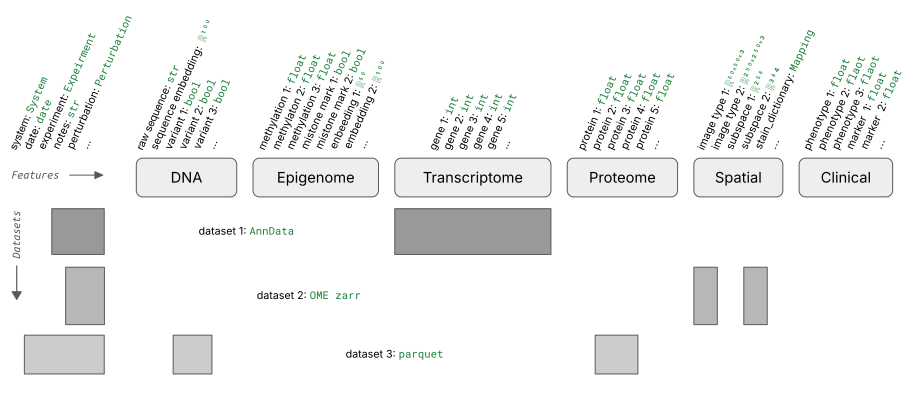
Read more: blog.lamin.ai/sparse-measurements.
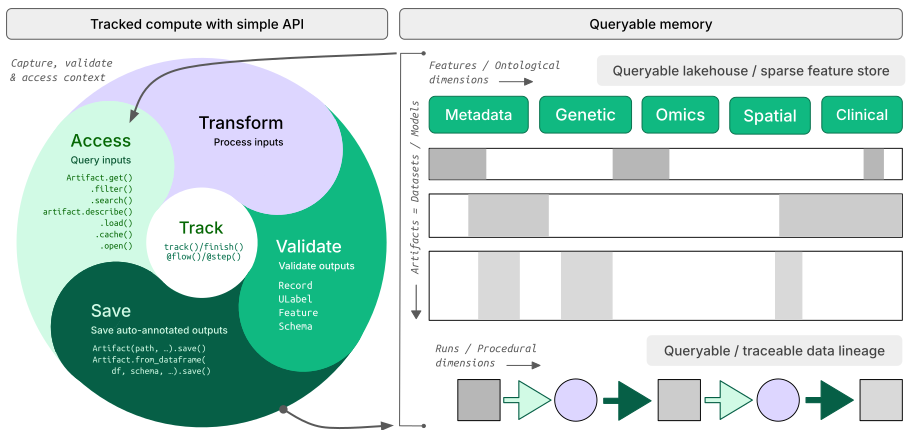
How?
lineage → track inputs & outputs of notebooks, scripts, functions & pipelines with a single line of code
lakehouse → manage, monitor & validate schemas for standard and bio formats; query across many datasets
FAIR datasets → validate & annotate
DataFrame,AnnData,SpatialData,parquet,zarr, …LIMS & ELN → programmatic experimental design with bio-registries, ontologies & markdown notes
unified access → storage locations (local, S3, GCP, …), SQL databases (Postgres, SQLite) & ontologies
reproducible → auto-track source code & compute environments with data & code versioning
change management → branching & merging similar to git, plan management for agents
Architecture?
zero lock-in → runs anywhere on open standards (Postgres, SQLite,
parquet,zarr, etc.)scalable → you hit storage & database directly through your
pydataor R stack, no REST API involvedsimple → just
pip installorinstall.packages('laminr')- no docker required, no separate backend to deployidempotent → re-run logic without worries about duplications or overwrites
distributed → zero-copy & lineage-aware data sharing across infrastructure (databases & storage locations)
extensible → create custom plug-ins based on the Django ORM, the basis for LaminDB’s registries
GUI, permissions, audit logs? LaminHub is a collaboration hub built on LaminDB similar to how GitHub is built on git.
Who?
Scientists and engineers at leading research institutions and biotech companies, including:
Industry → Pfizer, Altos Labs, Ensocell Therapeutics, …
Academia & Research → scverse, DZNE (National Research Center for Neuro-Degenerative Diseases), Helmholtz Munich (National Research Center for Environmental Health), …
Research Hospitals → Global Immunological Swarm Learning Network: Harvard, MIT, Stanford, ETH Zürich, Charité, U Bonn, Mount Sinai, …
From personal research projects to pharma-scale deployments managing petabytes of data across:
entities |
OOMs |
|---|---|
observations & datasets |
10¹² & 10⁶ |
runs & transforms |
10⁹ & 10⁵ |
proteins & genes |
10⁹ & 10⁶ |
biosamples & species |
10⁵ & 10² |
… |
… |
Quickstart
To install the Python package with recommended dependencies, use:
pip install lamindb
Install with minimal dependencies.
The lamindb package adds data-science related dependencies through the [full] extra, see here.
For a minimal install of the lamindb namespace, use:
pip install lamindb-core
Query databases & load artifacts
You can browse public databases at lamin.ai/explore. To query laminlabs/cellxgene, run:
import lamindb as ln

db = ln.DB("laminlabs/cellxgene")  # a database object for queries
df = db.Artifact.to_dataframe()    # a dataframe listing datasets & models
→ connected lamindb: anonymous/test-readme
! truncated query result to limit=100 Artifact objects (will change to limit=20 in lamindb 2.7)
To get a specific dataset, run:
artifact = db.Artifact.get("BnMwC3KZz0BuKftR")  # a metadata object for a dataset
artifact.describe()                             # describe the context of the dataset
Artifact: cell-census/2025-11-08/h5ads/82346769-8733-485e-ab49-f14923d2b5bc.h5ad (2025-11-08)
|   description: OPCs
├── uid: BnMwC3KZz0BuKftR0001            run: 7FgSsR6 (annotate-register-new-release.py)
│   kind: None                           otype: AnnData
│   hash: hu09QNaDv3RLVyvrAlOFfg         size: 63.2 MB
│   branch: main                         space: all
│   created_at: 2026-02-17 13:38:30 UTC  created_by: zethson
│   n_observations: 3324                 schema: CELLxGENE AnnData of ontology_id
├── storage/path: s3://cellxgene-data-public/cell-census/2025-11-08/h5ads/82346769-8733-485e-ab49-f14923d2b5bc.h5ad
├── Dataset features
│   ├── var (2)
│   │   feature_is_filtered            bool
│   │   var_index                      bionty.Gene.ensembl_gene_id[source…
│   ├── obs (11)
│   │   assay_ontology_term_id         bionty.ExperimentalFactor.ontology…  EFO:0009922
│   │   cell_type_ontology_term_id     bionty.CellType.ontology_id          CL:0002453
│   │   development_stage_ontology_t…  bionty.DevelopmentalStage.ontology…  HsapDv:0000147, HsapDv:0000162, HsapDv…
│   │   disease_ontology_term_id       bionty.Disease.ontology_id           MONDO:0004975, MONDO:0800027, PATO:000…
│   │   donor_id                       str
│   │   is_primary_data                ULabel
│   │   self_reported_ethnicity_onto…  bionty.Ethnicity.ontology_id         HANCESTRO:0568, HANCESTRO:0590, unknown
│   │   sex_ontology_term_id           bionty.Phenotype.ontology_id         PATO:0000383, PATO:0000384
│   │   suspension_type                ULabel                               nucleus
│   │   tissue_ontology_term_id        bionty.Tissue.ontology_id|bionty.C…  UBERON:0000451, UBERON:0016528, UBERON…
│   │   tissue_type                    ULabel                               tissue
│   └── uns (1)
│       organism_ontology_term_id      bionty.Organism.ontology_id          NCBITaxon:9606
└── Labels
    └── .ulabels                       ULabel                               nucleus, tissue
        .organisms                     bionty.Organism                      human
        .tissues                       bionty.Tissue                        prefrontal cortex, white matter of fro…
        .cell_types                    bionty.CellType                      oligodendrocyte precursor cell
        .diseases                      bionty.Disease                       Alzheimer disease, normal, leukoenceph…
        .phenotypes                    bionty.Phenotype                     female, male
        .experimental_factors          bionty.ExperimentalFactor            10x 3' v3
        .developmental_stages          bionty.DevelopmentalStage            81-year-old stage, 53-year-old stage, …
        .ethnicities                   bionty.Ethnicity                     unknown, African American, European Am…
See the output.
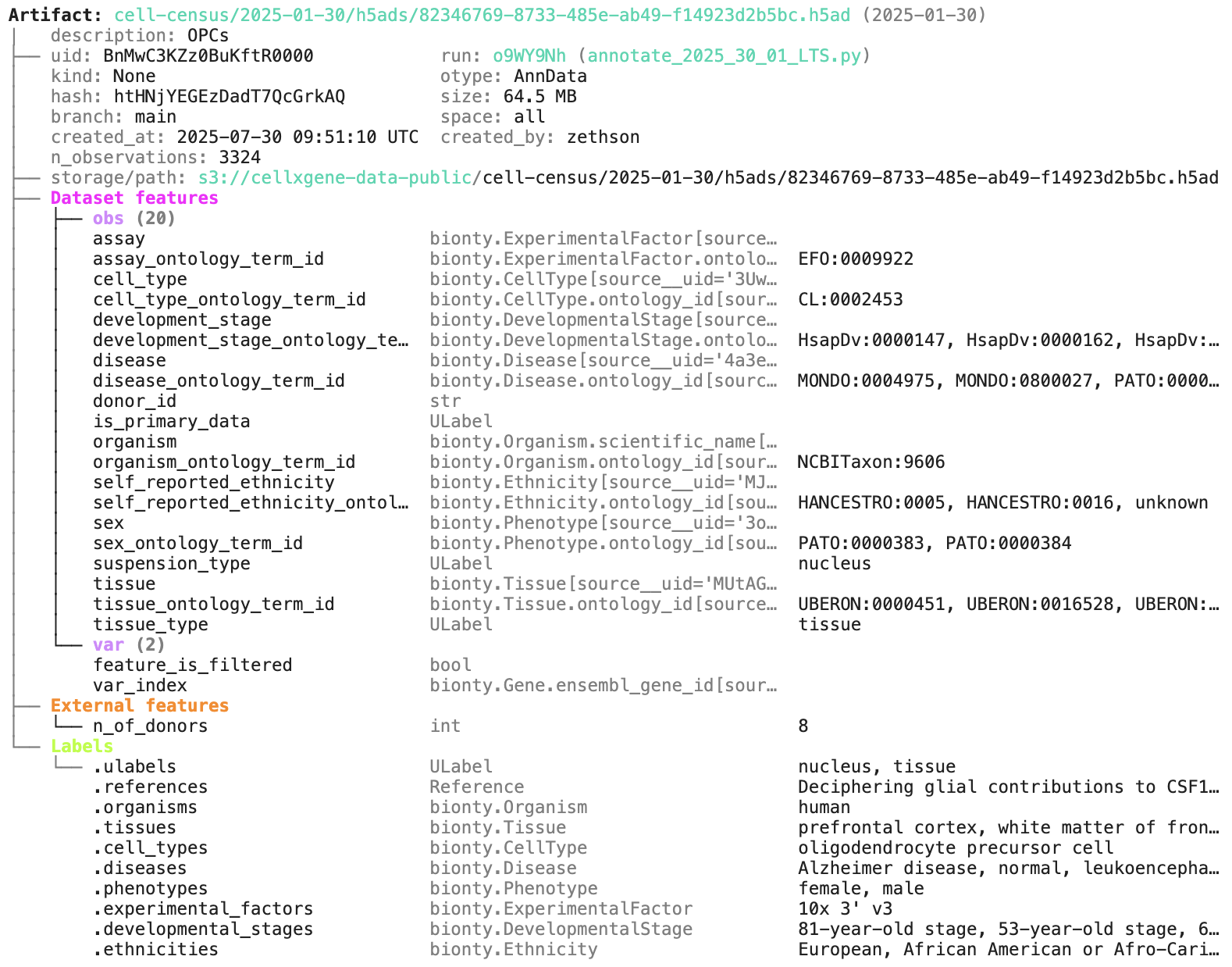
Access the content of the dataset via:
local_path = artifact.cache()  # return a local path from a cache
adata = artifact.load()        # load object into memory
! run input wasn't tracked, call `ln.track()` and re-run
! run input wasn't tracked, call `ln.track()` and re-run
You can query by biological entities like Disease through plug-in bionty:
alzheimers = db.bionty.Disease.get(name="Alzheimer disease")
df = db.Artifact.filter(diseases=alzheimers).to_dataframe()
Configure your database
You can create a LaminDB instance at lamin.ai and invite collaborators. To connect to an existing instance, run:
lamin login
lamin connect account/name  # add flag --here to sync with current development directory
If you prefer to init a new instance instead (no login required), run:
lamin init --storage ./quickstart-data --modules bionty
For more configuration, read: docs.lamin.ai/setup.
On the terminal and in a Python session, LaminDB will now auto-connect.
Save files & folders as artifacts
To save a file or folder via the API:
import lamindb as ln
# → connected lamindb: account/instance

open("sample.fasta", "w").write(">seq1\nACGT\n")        # create dataset
ln.Artifact("sample.fasta", key="sample.fasta").save()  # save dataset
! no run & transform got linked, call `ln.track()` & re-run
! calling anonymously, will miss private instances
Artifact(uid='ZGAn3CksmLkvyDnF0000', key='sample.fasta', description=None, suffix='.fasta', kind=None, otype=None, size=11, hash='83rEPcAoBHmYiIuyBYrFKg', n_files=None, n_observations=None, extra_data=None, branch_id=1, created_on_id=1, space_id=1, storage_id=1, run_id=None, schema_id=None, created_by_id=1, created_at=2026-06-23 06:36:43 UTC, is_locked=False, version_tag=None, is_latest=True)
To save a file or folder via the CLI, run:
lamin save sample.fasta --key sample.fasta
To load an artifact via the CLI into a local cache, run:
lamin load --key sample.fasta
Read more about the CLI: docs.lamin.ai/cli.
Lineage: scripts & notebooks
To create a dataset while tracking source code, inputs, outputs, logs, and environment:
import lamindb as ln
# → connected lamindb: account/instance

ln.track()                                              # track code execution
open("sample.fasta", "w").write(">seq1\nACGT\n")        # create dataset
ln.Artifact("sample.fasta", key="sample.fasta").save()  # save dataset
ln.finish()                                             # mark run as finished
→ created Transform('D7pMO52zqWS90000', key='README.ipynb'), started new Run('RnYs4SB6FYLEZe5O') at 2026-06-23 06:36:44 UTC
→ notebook imports: anndata==0.12.2 bionty==2.3.1 lamindb numpy==2.5.0 pandas==2.3.3
• recommendation: to identify the notebook across renames, pass the uid: ln.track("D7pMO52zqWS9")
→ returning artifact with same hash: Artifact(uid='ZGAn3CksmLkvyDnF0000', key='sample.fasta', description=None, suffix='.fasta', kind=None, otype=None, size=11, hash='83rEPcAoBHmYiIuyBYrFKg', n_files=None, n_observations=None, extra_data=None, branch_id=1, created_on_id=1, space_id=1, storage_id=1, run_id=None, schema_id=None, created_by_id=1, created_at=2026-06-23 06:36:43 UTC, is_locked=False, version_tag=None, is_latest=True); to track this artifact as an input, use: ln.Artifact.get()
! run was not set on Artifact(uid='ZGAn3CksmLkvyDnF0000', key='sample.fasta', description=None, suffix='.fasta', kind=None, otype=None, size=11, hash='83rEPcAoBHmYiIuyBYrFKg', n_files=None, n_observations=None, extra_data=None, branch_id=1, created_on_id=1, space_id=1, storage_id=1, run_id=None, schema_id=None, created_by_id=1, created_at=2026-06-23 06:36:43 UTC, is_locked=False, version_tag=None, is_latest=True), setting to current run
! cells [(5, 7), (9, 12), (23, 25)] were not run consecutively
→ finished Run('RnYs4SB6FYLEZe5O') after 3s at 2026-06-23 06:36:47 UTC
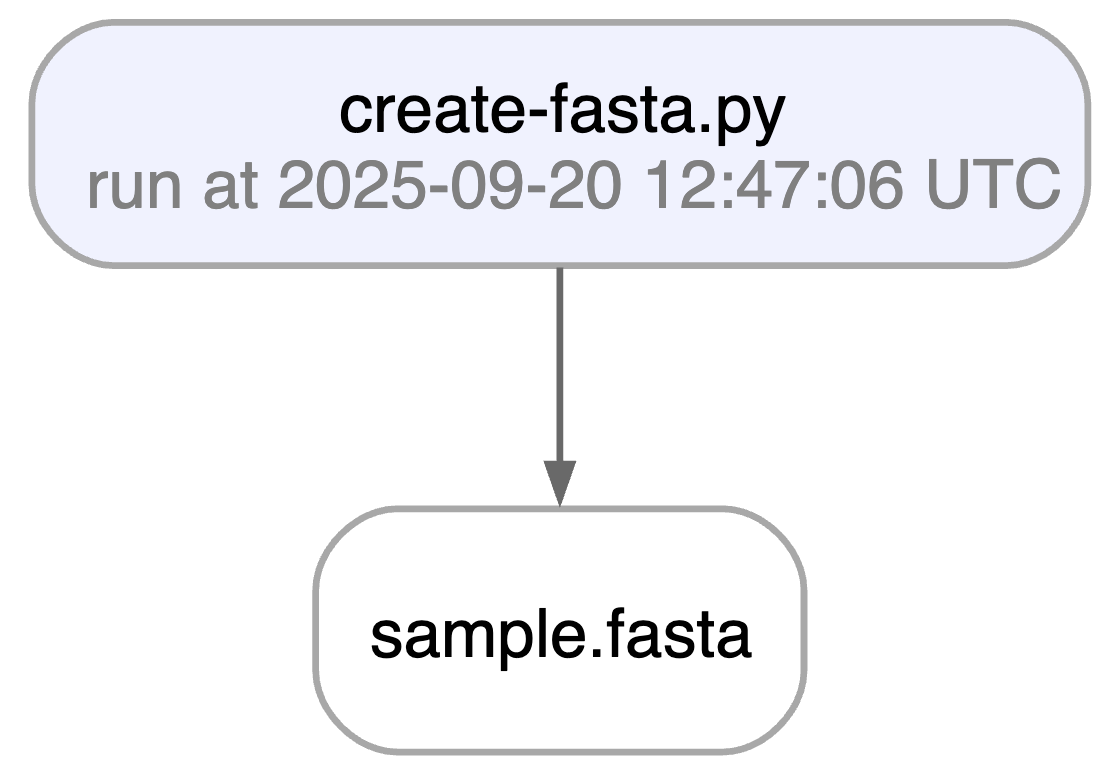
Running this snippet as a script (python create-fasta.py) produces the following data lineage:
artifact = ln.Artifact.get(key="sample.fasta")  # get artifact by key
artifact.describe()      # context of the artifact
artifact.view_lineage()  # fine-grained lineage
Artifact: sample.fasta (0000)
├── uid: ZGAn3CksmLkvyDnF0000            run: RnYs4SB (README.ipynb)
│   hash: 83rEPcAoBHmYiIuyBYrFKg         size: 11 B
│   branch: main                         space: all
│   created_at: 2026-06-23 06:36:43 UTC  created_by: anonymous
└── storage/path: /home/runner/work/lamindb/lamindb/test-readme/.lamindb/ZGAn3CksmLkvyDnF0000.fasta
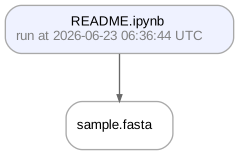

Watch a mini video: youtu.be/jwnHu1PbA9Q
Access run & transform.
run = artifact.run              # get the run object
transform = artifact.transform  # get the transform object
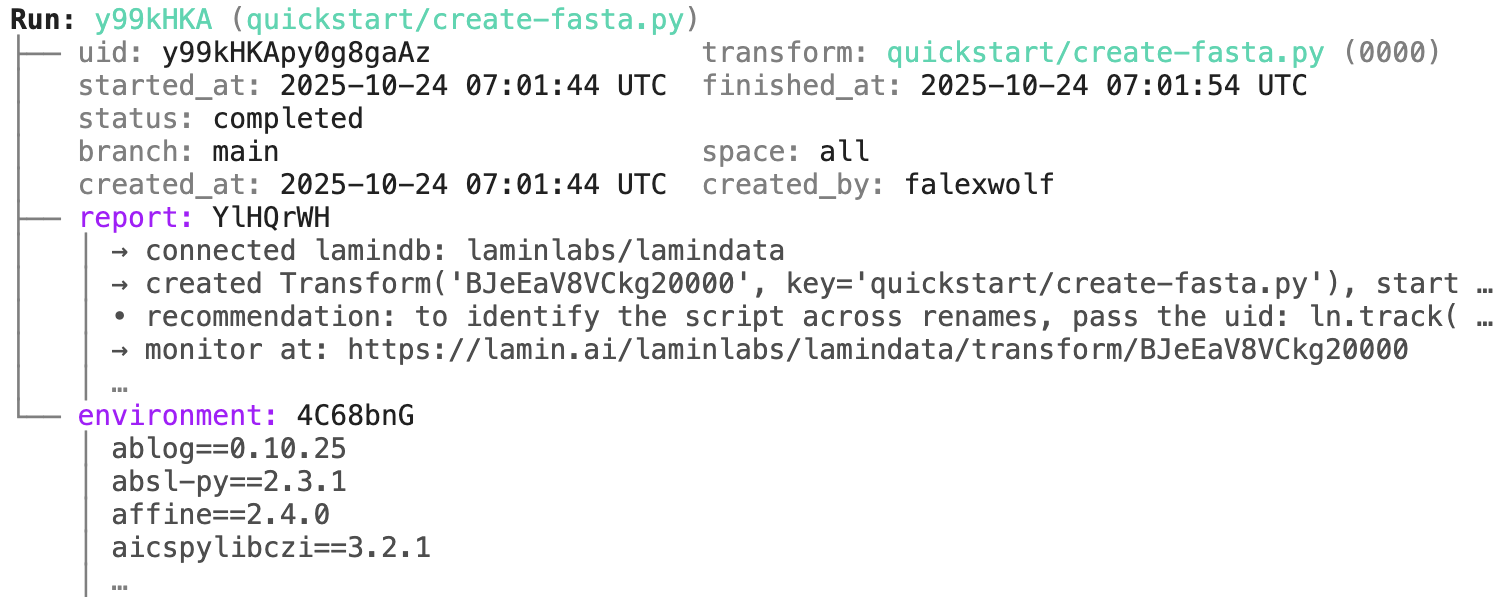
run.describe()                  # context of the run
LaminDB makes it easy to query, trace, and validate millions of datasets across diverse storage formats. It's built on open data standards with built-in data lineage and support for bio-formats, registries & ontologies.
Agent? llms.txt
Why?
While running comp bio, comp chem, and ML engineering teams for several years, we faced two main problems:
(1) We made incorrect assumptions about how datasets were generated because their processing steps couldn't always be traced.
(2) We found it difficult to train models on thousands of datasets across storage, LIMS, and ELN systems due to the lack of a unified query interface.
To fix these, we reduced data lineage tracking to a single line of code and unified queries across storage and databases, scaling to millions of features.
Read more: blog.lamin.ai/sparse-measurements.
How?
- lineage → track inputs & outputs of notebooks, scripts, functions & pipelines with a single line of code
- lakehouse → manage, monitor & validate schemas for standard and bio formats; query across many datasets
- FAIR datasets → validate & annotate
DataFrame,AnnData,SpatialData,parquet,zarr, … - LIMS & ELN → programmatic experimental design with bio-registries, ontologies & markdown notes
- unified access → storage locations (local, S3, GCP, …), SQL databases (Postgres, SQLite) & ontologies
- reproducible → auto-track source code & compute environments with data & code versioning
- change management → branching & merging similar to git, plan management for agents
Architecture?
- zero lock-in → runs anywhere on open standards (Postgres, SQLite,
parquet,zarr, etc.) - scalable → you hit storage & database directly through your
pydataor R stack, no REST API involved - simple → just
pip installorinstall.packages('laminr')- no docker required, no separate backend to deploy - idempotent → re-run logic without worries about duplications or overwrites
- distributed → zero-copy & lineage-aware data sharing across infrastructure (databases & storage locations)
- integrations → git, nextflow, vitessce, redun, and more
- extensible → create custom plug-ins based on the Django ORM, the basis for LaminDB's registries
GUI, permissions, audit logs? LaminHub is a collaboration hub built on LaminDB similar to how GitHub is built on git.
Who?
Scientists and engineers at leading research institutions and biotech companies, including:
- Industry → Pfizer, Altos Labs, Ensocell Therapeutics, ...
- Academia & Research → scverse, DZNE (National Research Center for Neuro-Degenerative Diseases), Helmholtz Munich (National Research Center for Environmental Health), ...
- Research Hospitals → Global Immunological Swarm Learning Network: Harvard, MIT, Stanford, ETH Zürich, Charité, U Bonn, Mount Sinai, ...
From personal research projects to pharma-scale deployments managing petabytes of data across:
| entities | OOMs |
|---|---|
| observations & datasets | 10¹² & 10⁶ |
| runs & transforms | 10⁹ & 10⁵ |
| proteins & genes | 10⁹ & 10⁶ |
| biosamples & species | 10⁵ & 10² |
| ... | ... |
Quickstart
To install the Python package with recommended dependencies, use:
pip install lamindb
Install with minimal dependencies.
The lamindb package adds data-science related dependencies through the [full] extra, see here.
For a minimal install of the lamindb namespace, use:
pip install lamindb-core
Query databases & load artifacts
You can browse public databases at lamin.ai/explore. To query laminlabs/cellxgene, run:
import lamindb as ln

db = ln.DB("laminlabs/cellxgene")  # a database object for queries
df = db.Artifact.to_dataframe()    # a dataframe listing datasets & models
To get a specific dataset, run:
artifact = db.Artifact.get("BnMwC3KZz0BuKftR")  # a metadata object for a dataset
artifact.describe()                             # describe the context of the dataset
See the output.
Access the content of the dataset via:
local_path = artifact.cache()  # return a local path from a cache
adata = artifact.load()        # load object into memory
You can query by biological entities like Disease through plug-in bionty:
alzheimers = db.bionty.Disease.get(name="Alzheimer disease")
df = db.Artifact.filter(diseases=alzheimers).to_dataframe()
Configure your database
You can create a LaminDB instance at lamin.ai and invite collaborators. To connect to an existing instance, run:
lamin login
lamin connect account/name  # add flag --here to sync with current development directory
If you prefer to init a new instance instead (no login required), run:
lamin init --storage ./quickstart-data --modules bionty
For more configuration, read: docs.lamin.ai/setup.
On the terminal and in a Python session, LaminDB will now auto-connect.
Save files & folders as artifacts
To save a file or folder via the API:
import lamindb as ln
# → connected lamindb: account/instance

open("sample.fasta", "w").write(">seq1\nACGT\n")        # create dataset
ln.Artifact("sample.fasta", key="sample.fasta").save()  # save dataset
To save a file or folder via the CLI, run:
lamin save sample.fasta --key sample.fasta
To load an artifact via the CLI into a local cache, run:
lamin load --key sample.fasta
Read more about the CLI: docs.lamin.ai/cli.
Lineage: scripts & notebooks
To create a dataset while tracking source code, inputs, outputs, logs, and environment:
import lamindb as ln
# → connected lamindb: account/instance

ln.track()                                              # track code execution
open("sample.fasta", "w").write(">seq1\nACGT\n")        # create dataset
ln.Artifact("sample.fasta", key="sample.fasta").save()  # save dataset
ln.finish()                                             # mark run as finished
Running this snippet as a script (python create-fasta.py) produces the following data lineage:
artifact = ln.Artifact.get(key="sample.fasta")  # get artifact by key
artifact.describe()      # context of the artifact
artifact.view_lineage()  # fine-grained lineage
run = artifact.run              # get the run object
transform = artifact.transform  # get the transform object
run.describe()                  # context of the run
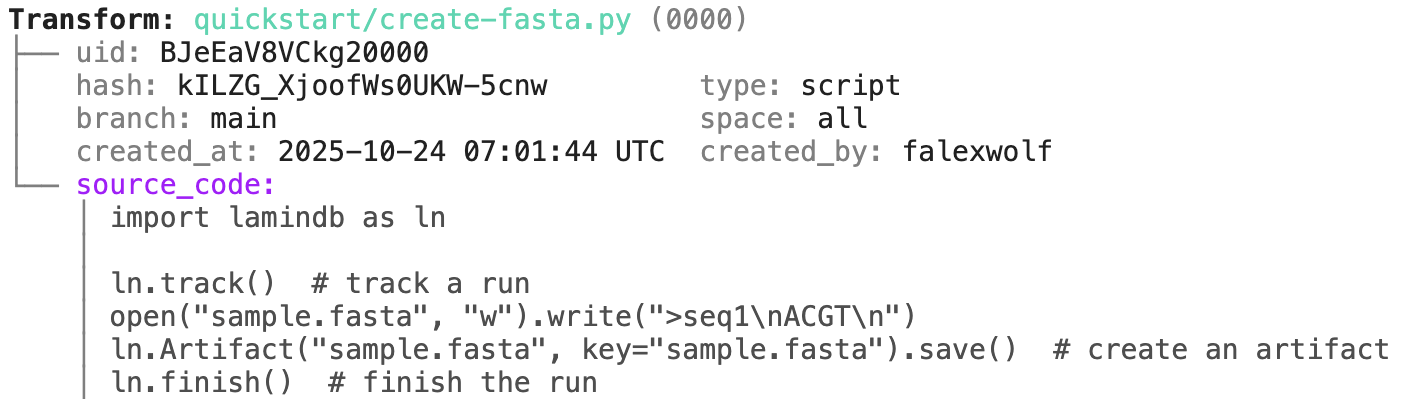
transform.describe() # context of the transform
Track a project or an agent plan.
Pass a project/artifact to ln.track(), for example:
Note that you have to create a project or save the agent plan in case they don't yet exist:
# create a project with the CLI
lamin create project "My project"

# save an agent plan with the CLI
lamin save /path/to/.cursor/plans/curate-dataset-x.plan.md
lamin save /path/to/.claude/plans/curate-dataset-x.md
Or in Python:
import lamindb as ln

@ln.flow()
def create_fasta(fasta_file: str = "sample.fasta"):
    open(fasta_file, "w").write(">seq1\nACGT\n")    # create dataset
    ln.Artifact(fasta_file, key=fasta_file).save()  # save dataset

if __name__ == "__main__":
    pass
Beyond what you get for scripts & notebooks, this automatically tracks function & CLI params and integrates well with established Python workflow managers: docs.lamin.ai/track. To integrate advanced bioinformatics pipeline managers like Nextflow, see docs.lamin.ai/pipelines.
A richer example.
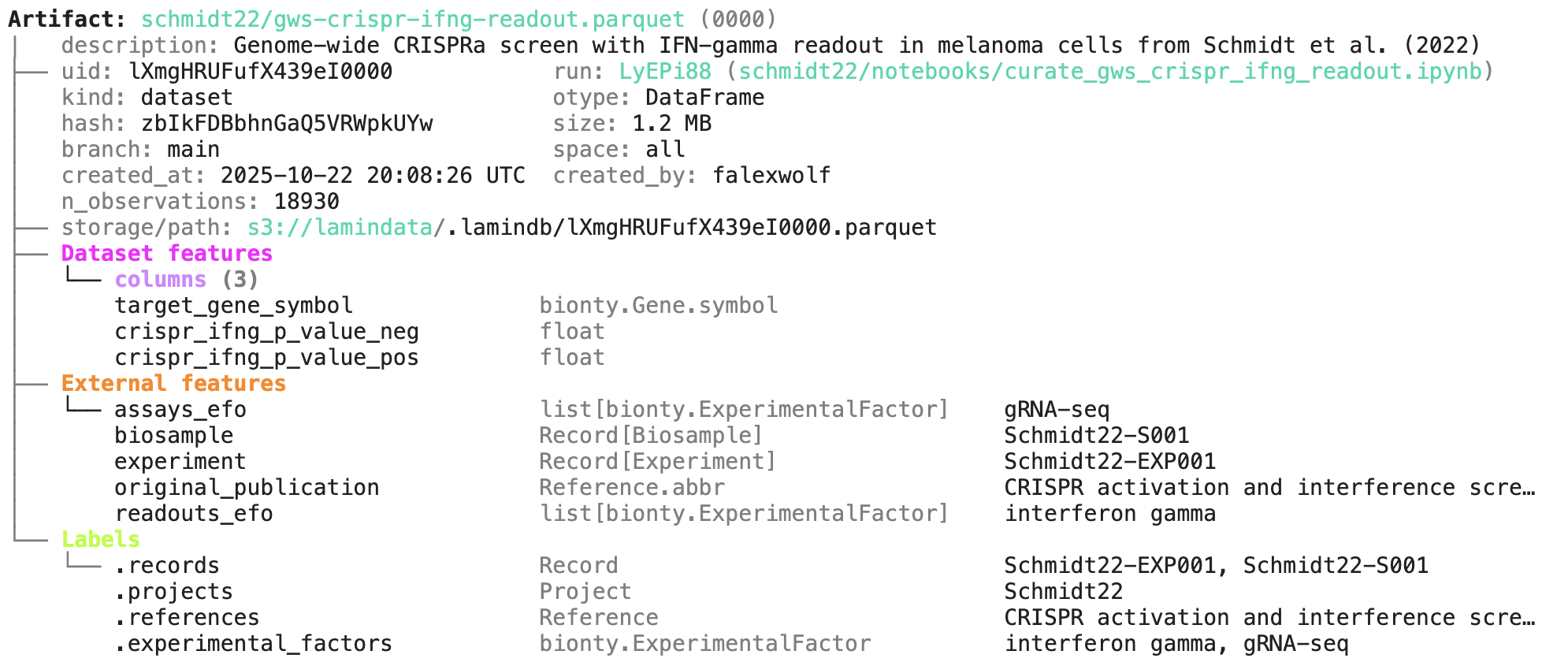
Here is an automatically generated re-construction of the project of Schmidt et al. (Science, 2022):
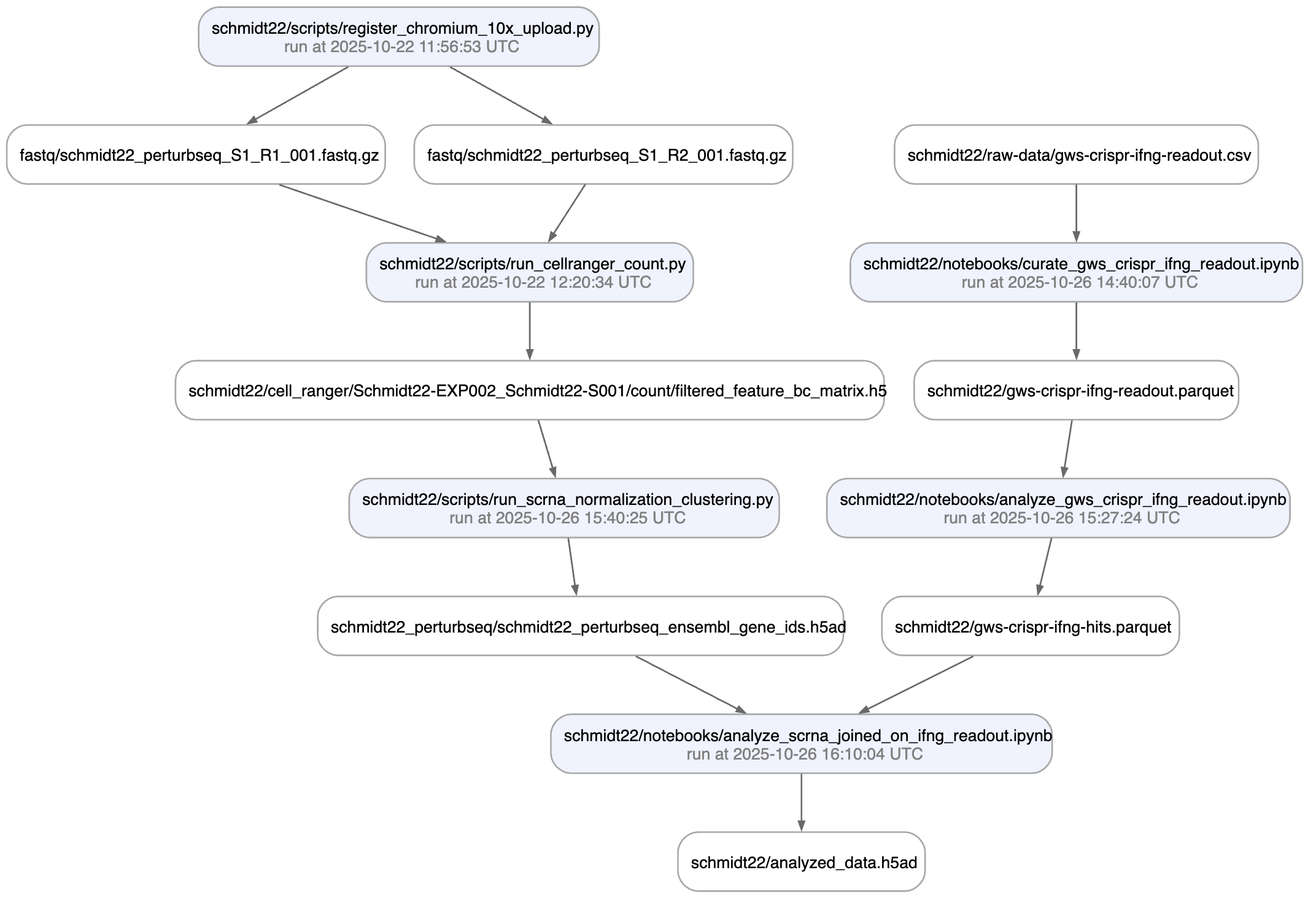
A phenotypic CRISPRa screening result is integrated with scRNA-seq data. Here is the result of the screen input:
Labeling & queries by fields
You can label an artifact by running:
my_label = ln.ULabel(name="My label").save()   # a universal label
project = ln.Project(name="My project").save() # a project label
artifact.ulabels.add(my_label)
artifact.projects.add(project)
Query for it:
ln.Artifact.filter(ulabels=my_label, projects=project).to_dataframe()
You can also query by the metadata that lamindb automatically collects:
ln.Artifact.filter(run=run).to_dataframe()              # by creating run
ln.Artifact.filter(transform=transform).to_dataframe()  # by creating transform
ln.Artifact.filter(size__gt=1e6).to_dataframe()         # size greater than 1MB
If you want to include more information into the resulting dataframe, pass include.
ln.Artifact.to_dataframe(include=["created_by__name", "storage__root"]) # include fields from related registries
Note: The query syntax for DB objects and for your default database is the same.
The core data model
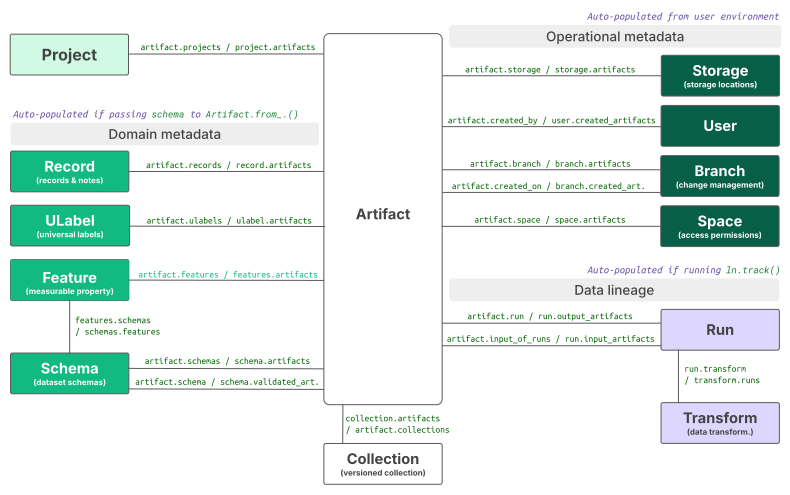
Here is an overview that illustrates how Artifact links to all other registries:
Read more: docs.lamin.ai/organize.
Queries by features
You can annotate datasets and samples with features. Let's define some:
from datetime import date

gc_content = ln.Feature(name="gc_content", dtype=float).save()
experiment_note = ln.Feature(name="experiment_note", dtype=str).save()
experiment_date = ln.Feature(name="experiment_date", dtype=date, coerce=True).save()  # accept date strings
During annotation, feature names and data types are validated against these definitions.
artifact.features.set_values({
    gc_content: 0.55,
    experiment_note: "Looks great",
    experiment_date: "2025-10-24",
})
Query for it:
ln.Artifact.filter(experiment_date="2025-10-24").to_dataframe() # query all artifacts annotated with `experiment_date`
If you want to include the feature values into the dataframe, pass include.
ln.Artifact.to_dataframe(include="features") # include the feature annotations
ln.Record(name="Sample 1", features={gc_content: 0.5}).save()
You can dynamically create registries and relationships of entities:
# create an experiments registry by defining a record type
experiments_registry = ln.Record(name="Experiments", is_type=True).save()

# create a record inside the Experiments registry
ln.Record(name="Experiment 1", type=experiments_registry).save()

# create a feature that links experiments, creating a relationship
experiment = ln.Feature(name="experiment", dtype=experiments_registry).save()

# create a sample record that links the sample to `Experiment 1` via the `experiment` feature
ln.Record(name="Sample 2", features={gc_content: 0.5, experiment: "Experiment 1"}).save()
You can export a dynamic registry as a dataframe:
experiments_registry.to_dataframe()
import lamindb as ln

ln.track()
open("sample.fasta", "w").write(">seq1\nTGCA\n")  # a new sequence
ln.Artifact("sample.fasta", key="sample.fasta", features={"experiment": "Experiment 1"}).save()  # annotate with the new experiment
ln.finish()
If you now query by key, you'll get the latest version of this artifact:
artifact = ln.Artifact.get(key="sample.fasta")  # get artifact by key
artifact.versions.to_dataframe()                # see all versions of that artifact
Change management
To create a contribution branch and switch to it, run:
lamin switch -c my_branch
To merge a contribution branch into main, run:
lamin switch main  # switch to the main branch
lamin merge my_branch  # merge contribution branch into main
Read more: docs.lamin.ai/lamindb.branch.
Data sharing
To share data in a lineage-aware way, sync objects from a source database to your default database:
db = ln.DB("laminlabs/lamindata")
artifact = db.Artifact.get(key="example_datasets/mini_immuno/dataset1.h5ad")
artifact.save()
This is zero-copy for the artifact's data in storage. Read more: docs.lamin.ai/transfer.
Lakehouse ♾️ feature store
Here is how you ingest a DataFrame:
import pandas as pd

df = pd.DataFrame({
    "sequence_str": ["ACGT", "TGCA"],
    "gc_content": [0.55, 0.54],
    "experiment_note": ["Looks great", "Ok"],
    "experiment_date": [date(2025, 10, 24), date(2025, 10, 25)],
})
ln.Artifact.from_dataframe(df, key="my_datasets/sequences.parquet").save()  # no validation
To validate & annotate the content of the dataframe, use the built-in schema valid_features:
ln.Feature(name="sequence_str", dtype=str).save()  # define a remaining feature
artifact = ln.Artifact.from_dataframe(
    df,
    key="my_datasets/sequences.parquet",
    schema="valid_features"  # validate columns against features
).save()
artifact.describe()
Watch a mini video: youtu.be/Ji6E7hTnReQ
You can filter for datasets by schema and then launch distributed queries and batch loading.
Lakehouse beyond tables
To validate an AnnData with built-in schema ensembl_gene_ids_and_valid_features_in_obs, call:
import anndata as ad
import numpy as np
import pandas as pd

adata = ad.AnnData(
    X=np.ones((21, 10)),
    obs=pd.DataFrame({'cell_type_by_model': ['T cell', 'B cell', 'NK cell'] * 7}),
    var=pd.DataFrame(index=[f'ENSG{i:011d}' for i in range(10)])
)
artifact = ln.Artifact.from_anndata(
    adata,
    key="my_datasets/scrna.h5ad",
    schema="ensembl_gene_ids_and_valid_features_in_obs"
).save()
artifact.describe()
To validate a SpatialData or any other array-like dataset, you need to construct a Schema. You can do this by composing simple pandera-style schemas: docs.lamin.ai/curate.
Ontologies
Plugin bionty gives you >20 public ontologies as SQLRecord registries. This was used to validate the ENSG ids in the adata just before.
import bionty as bt

bt.CellType.import_source()  # import the default ontology
bt.CellType.to_dataframe()   # your extensible cell type ontology in a simple registry
You can then create objects, e.g. for labeling, analogous to ULabel, Project, or Record:
t_cell = bt.CellType.get(name="T cell")
artifact.cell_types.add(t_cell)
Read more: docs.lamin.ai/manage-ontologies.
Watch a mini video: youtu.be/3vpWjHj3Kw8
Save unstructured notes
When in your development directory, you can save markdown files as records:
lamin save <topic>/<my-note.md>
Run: RnYs4SB (README.ipynb)
├── uid: RnYs4SB6FYLEZe5O                transform: README.ipynb (0000)
│   started_at: 2026-06-23 06:36:44 UTC  finished_at: 2026-06-23 06:36:47 UTC
│   status: completed
│   branch: main                         space: all
│   created_at: 2026-06-23 06:36:44 UTC  created_by: anonymous
└── environment: aLNSb4f
    │ aiobotocore==3.7.0
    │ aiohappyeyeballs==2.6.2
    │ aiohttp==3.14.1
    │ aioitertools==0.13.0
    │ …
transform.describe() # context of the transform
Transform: README.ipynb (0000) | description: LaminDB - Open-source data lakehouse for biology ├── uid: D7pMO52zqWS90000 │ hash: bsvzOJATSU-LDtKBoW6vYg type: notebook │ branch: main space: all │ created_at: 2026-06-23 06:36:44 UTC created_by: anonymous └── source_code: │ # %% [markdown] │ # [](https://docs.lamin.ai) [ │ # │ # <details> │ # <summary>Why?</summary> │ # │ # While running comp bio, comp chem, and ML engineering teams for several years, … │ # │ # (1) We made incorrect assumptions about how datasets were generated because th … │ # │ # (2) We found it difficult to train models on thousands of datasets across stor … │ # │ # To fix these, we reduced data lineage tracking to a single line of code and un … │ # │ # <img width="800" alt="sparse-measurements" src="https://lamin-site-assets.s3.a … │ # │ # Read more: [blog.lamin.ai/sparse-measurements](https://blog.lamin.ai/sparse-me … │ # │ # </details> │ # │ # <img width="800px" alt="lamindb-schematic" src="https://lamin-site-assets.s3.a … │ # │ # How? │ …
Track a project or an agent plan.
Pass a project/artifact to ln.track(), for example:
Note that you have to create a project or save the agent plan in case they don’t yet exist:
# create a project with the CLI
lamin create project "My project"

# save an agent plan with the CLI
lamin save /path/to/.cursor/plans/curate-dataset-x.plan.md
lamin save /path/to/.claude/plans/curate-dataset-x.md
Or in Python:
Lineage: functions & workflows
You can achieve the same traceability for functions & workflows:
import lamindb as ln

@ln.flow()
def create_fasta(fasta_file: str = "sample.fasta"):
    open(fasta_file, "w").write(">seq1\nACGT\n")    # create dataset
    ln.Artifact(fasta_file, key=fasta_file).save()  # save dataset

if __name__ == "__main__":
    pass
Beyond what you get for scripts & notebooks, this automatically tracks function & CLI params and integrates well with established Python workflow managers: docs.lamin.ai/track. To integrate advanced bioinformatics pipeline managers like Nextflow, see docs.lamin.ai/pipelines.
A richer example.
Here is an automatically generated re-construction of the project of Schmidt et al. (Science, 2022):
A phenotypic CRISPRa screening result is integrated with scRNA-seq data. Here is the result of the screen input:
Labeling & queries by fields
You can label an artifact by running:
my_label = ln.ULabel(name="My label").save()   # a universal label
project = ln.Project(name="My project").save() # a project label
artifact.ulabels.add(my_label)
artifact.projects.add(project)
Query for it:
ln.Artifact.filter(ulabels=my_label, projects=project).to_dataframe()
| uid | key | description | suffix | kind | otype | size | hash | n_files | n_observations | ... | is_latest | is_locked | created_at | branch_id | created_on_id | space_id | storage_id | run_id | schema_id | created_by_id | |
|---|---|---|---|---|---|---|---|---|---|---|---|---|---|---|---|---|---|---|---|---|---|
| id | |||||||||||||||||||||
| 1 | ZGAn3CksmLkvyDnF0000 | sample.fasta | None | .fasta | None | None | 11 | 83rEPcAoBHmYiIuyBYrFKg | None | None | ... | True | False | 2026-06-23 06:36:43.669000+00:00 | 1 | 1 | 1 | 1 | 1 | None | 1 |
1 rows × 22 columns
You can also query by the metadata that lamindb automatically collects:
ln.Artifact.filter(run=run).to_dataframe()              # by creating run
ln.Artifact.filter(transform=transform).to_dataframe()  # by creating transform
ln.Artifact.filter(size__gt=1e6).to_dataframe()         # size greater than 1MB
| uid | id | key | description | suffix | kind | otype | size | hash | n_files | ... | is_latest | is_locked | created_at | branch_id | created_on_id | space_id | storage_id | run_id | schema_id | created_by_id |
|---|
0 rows × 23 columns
If you want to include more information into the resulting dataframe, pass include.
ln.Artifact.to_dataframe(include=["created_by__name", "storage__root"]) # include fields from related registries
| uid | key | created_by__name | storage__root | |
|---|---|---|---|---|
| id | ||||
| 1 | ZGAn3CksmLkvyDnF0000 | sample.fasta | None | /home/runner/work/lamindb/lamindb/test-readme |
Note: The query syntax for DB objects and for your default database is the same.
The core data model
Here is an overview that illustrates how Artifact links to all other registries:
Read more: docs.lamin.ai/organize.
Queries by features
You can annotate datasets and samples with features. Let’s define some:
from datetime import date

gc_content = ln.Feature(name="gc_content", dtype=float).save()
experiment_note = ln.Feature(name="experiment_note", dtype=str).save()
experiment_date = ln.Feature(name="experiment_date", dtype=date, coerce=True).save()  # accept date strings
During annotation, feature names and data types are validated against these definitions.
artifact.features.set_values({
    gc_content: 0.55,
    experiment_note: "Looks great",
    experiment_date: "2025-10-24",
})
Query for it:
ln.Artifact.filter(experiment_date="2025-10-24").to_dataframe() # query all artifacts annotated with `experiment_date`
| uid | key | description | suffix | kind | otype | size | hash | n_files | n_observations | ... | is_latest | is_locked | created_at | branch_id | created_on_id | space_id | storage_id | run_id | schema_id | created_by_id | |
|---|---|---|---|---|---|---|---|---|---|---|---|---|---|---|---|---|---|---|---|---|---|
| id | |||||||||||||||||||||
| 1 | ZGAn3CksmLkvyDnF0000 | sample.fasta | None | .fasta | None | None | 11 | 83rEPcAoBHmYiIuyBYrFKg | None | None | ... | True | False | 2026-06-23 06:36:43.669000+00:00 | 1 | 1 | 1 | 1 | 1 | None | 1 |
1 rows × 22 columns
If you want to include the feature values into the dataframe, pass include.
ln.Artifact.to_dataframe(include="features") # include the feature annotations
→ queried for all categorical features of dtypes Record or ULabel and non-categorical features: (3) ['gc_content', 'experiment_note', 'experiment_date']
| uid | key | gc_content | experiment_note | experiment_date | |
|---|---|---|---|---|---|
| id | |||||
| 1 | ZGAn3CksmLkvyDnF0000 | sample.fasta | 0.55 | Looks great | 2025-10-24 |
Lake ♾️ LIMS ♾️ Sheets
You can create records for entities underlying your experiments (samples, perturbations, instruments, etc.):
ln.Record(name="Sample 1", features={gc_content: 0.5}).save()
Record(uid='oiCGklMgSTuZJGUe', is_type=False, name='Sample 1', description=None, reference=None, reference_type=None, extra_data=None, branch_id=1, created_on_id=1, space_id=1, created_by_id=1, type_id=None, schema_id=None, run_id=None, created_at=2026-06-23 06:36:48 UTC, is_locked=False)
You can dynamically create registries and relationships of entities:
# create an experiments registry by defining a record type
experiments_registry = ln.Record(name="Experiments", is_type=True).save()

# create a record inside the Experiments registry
ln.Record(name="Experiment 1", type=experiments_registry).save()

# create a feature that links experiments, creating a relationship
experiment = ln.Feature(name="experiment", dtype=experiments_registry).save()

# create a sample record that links the sample to `Experiment 1` via the `experiment` feature
ln.Record(name="Sample 2", features={gc_content: 0.5, experiment: "Experiment 1"}).save()
! you are trying to create a record with name='experiment' but records with similar names exist: 'experiment_note', 'experiment_date'. Did you mean to load one of them?
! you are trying to create a record with name='Sample 2' but a record with similar name exists: 'Sample 1'. Did you mean to load it?
Record(uid='JAksEJvuP4JtMRCQ', is_type=False, name='Sample 2', description=None, reference=None, reference_type=None, extra_data=None, branch_id=1, created_on_id=1, space_id=1, created_by_id=1, type_id=None, schema_id=None, run_id=None, created_at=2026-06-23 06:36:48 UTC, is_locked=False)
You can export a dynamic registry as a dataframe:
experiments_registry.to_dataframe()
→ exporting 1 records of 'Experiments'
→ queried for all categorical features of dtypes Record or ULabel and non-categorical features: (4) ['gc_content', 'experiment_note', 'experiment_date', 'experiment']
| __lamindb_record_uid__ | __lamindb_record_name__ | |
|---|---|---|
| __lamindb_record_id__ | ||
| 3 | p6dA1e31d1oDbPIx | Experiment 1 |
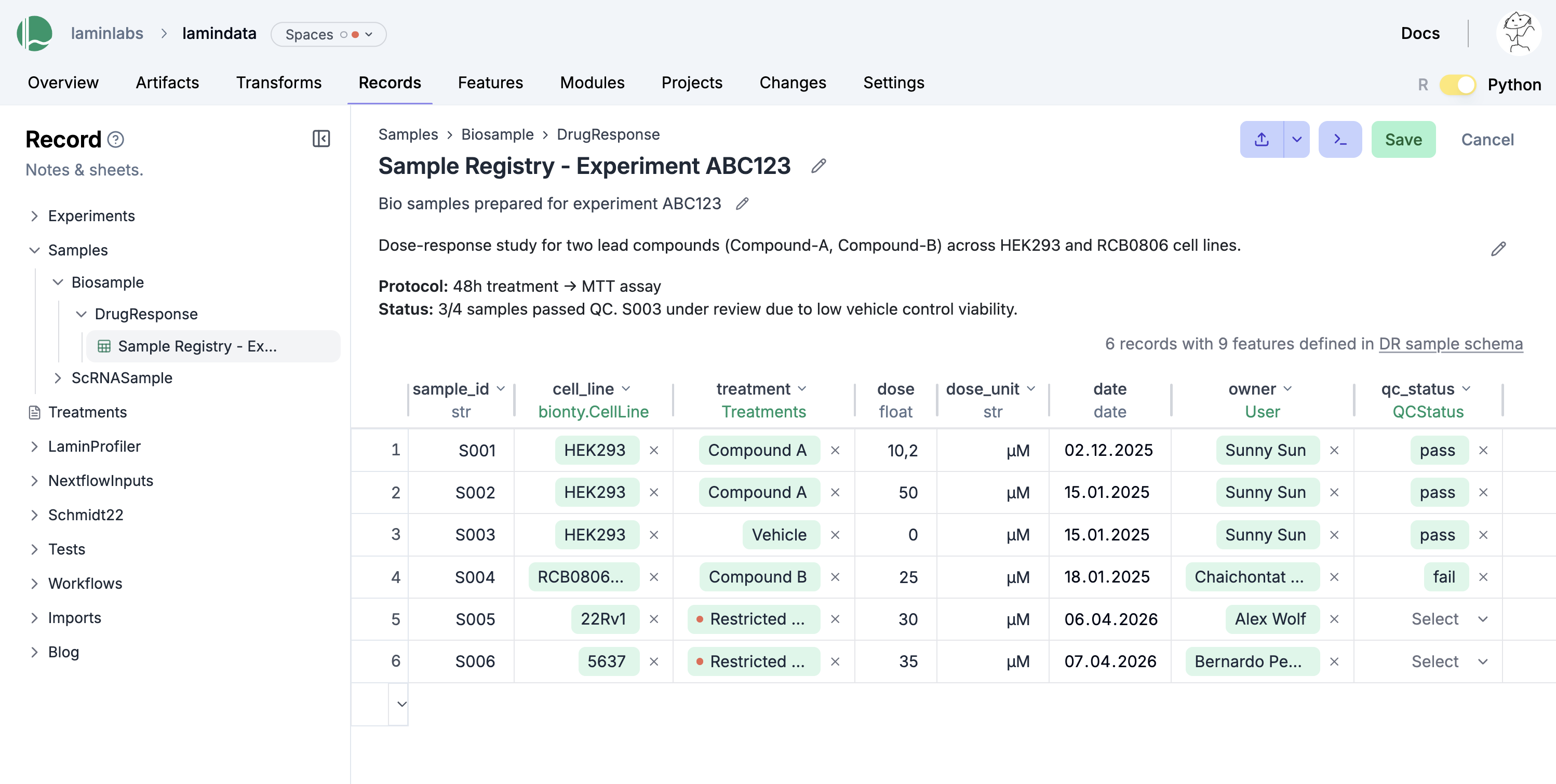
You can edit records like Excel sheets on LaminHub.
Data versioning
If you change source code or datasets, LaminDB manages versioning for you.
Assume you run a new version of our create-fasta.py script to create a new version of sample.fasta.
import lamindb as ln

ln.track()
open("sample.fasta", "w").write(">seq1\nTGCA\n")  # a new sequence
ln.Artifact("sample.fasta", key="sample.fasta", features={"experiment": "Experiment 1"}).save()  # annotate with the new experiment
ln.finish()
→ found notebook README.ipynb, making new version -- anticipating changes
→ created Transform('D7pMO52zqWS90001', key='README.ipynb'), started new Run('mIQKfeNflBheK6ku') at 2026-06-23 06:36:48 UTC
→ notebook imports: anndata==0.12.2 bionty==2.3.1 lamindb numpy==2.5.0 pandas==2.3.3
• recommendation: to identify the notebook across renames, pass the uid: ln.track("D7pMO52zqWS9")
→ creating new artifact version for key 'sample.fasta' in storage '/home/runner/work/lamindb/lamindb/test-readme'
! cells [(5, 7), (9, 12), (23, 25)] were not run consecutively
→ returning artifact with same hash: Artifact(uid='gr57onBbJSae5lKJ0000', key=None, description='Report of run RnYs4SB6FYLEZe5O', suffix='.html', kind='__lamindb_run__', otype=None, size=349116, hash='257Zgiftx8h8Qv0z2TpGtA', n_files=None, n_observations=None, extra_data=None, branch_id=1, created_on_id=1, space_id=1, storage_id=1, run_id=None, schema_id=None, created_by_id=1, created_at=2026-06-23 06:36:47 UTC, is_locked=False, version_tag=None, is_latest=True); to track this artifact as an input, use: ln.Artifact.get()
! run was not set on Artifact(uid='gr57onBbJSae5lKJ0000', key=None, description='Report of run RnYs4SB6FYLEZe5O', suffix='.html', kind='__lamindb_run__', otype=None, size=349116, hash='257Zgiftx8h8Qv0z2TpGtA', n_files=None, n_observations=None, extra_data=None, branch_id=1, created_on_id=1, space_id=1, storage_id=1, run_id=None, schema_id=None, created_by_id=1, created_at=2026-06-23 06:36:47 UTC, is_locked=False, version_tag=None, is_latest=True), setting to current run
! updated description from Report of run RnYs4SB6FYLEZe5O to Report of run mIQKfeNflBheK6ku
! returning transform with same hash & key: Transform(uid='D7pMO52zqWS90000', key='README.ipynb', description='LaminDB - Open-source data lakehouse for biology', kind='notebook', hash='bsvzOJATSU-LDtKBoW6vYg', reference=None, reference_type=None, environment=None, plan=None, branch_id=1, created_on_id=1, space_id=1, run_id=None, created_by_id=1, created_at=2026-06-23 06:36:44 UTC, is_locked=False, version_tag=None, is_latest=False)
! run was not set on Transform(uid='D7pMO52zqWS90000', key='README.ipynb', description='LaminDB - Open-source data lakehouse for biology', kind='notebook', hash='bsvzOJATSU-LDtKBoW6vYg', reference=None, reference_type=None, environment=None, plan=None, branch_id=1, created_on_id=1, space_id=1, run_id=None, created_by_id=1, created_at=2026-06-23 06:36:44 UTC, is_locked=False, version_tag=None, is_latest=False), setting to current run
• new latest Transform version is: D7pMO52zqWS90000
→ finished Run('mIQKfeNflBheK6ku') after 1s at 2026-06-23 06:36:50 UTC
If you now query by key, you’ll get the latest version of this artifact:
artifact = ln.Artifact.get(key="sample.fasta")  # get artifact by key
artifact.versions.to_dataframe()                # see all versions of that artifact
| uid | key | description | suffix | kind | otype | size | hash | n_files | n_observations | ... | is_latest | is_locked | created_at | branch_id | created_on_id | space_id | storage_id | run_id | schema_id | created_by_id | |
|---|---|---|---|---|---|---|---|---|---|---|---|---|---|---|---|---|---|---|---|---|---|
| id | |||||||||||||||||||||
| 4 | ZGAn3CksmLkvyDnF0001 | sample.fasta | None | .fasta | None | None | 11 | aqvq4CskQu3Nnr3hl5r3ug | None | None | ... | True | False | 2026-06-23 06:36:49.436000+00:00 | 1 | 1 | 1 | 1 | 3 | None | 1 |
| 1 | ZGAn3CksmLkvyDnF0000 | sample.fasta | None | .fasta | None | None | 11 | 83rEPcAoBHmYiIuyBYrFKg | None | None | ... | False | False | 2026-06-23 06:36:43.669000+00:00 | 1 | 1 | 1 | 1 | 1 | None | 1 |
2 rows × 22 columns
Change management
To create a contribution branch and switch to it, run:
lamin switch -c my_branch
To merge a contribution branch into main, run:
lamin switch main  # switch to the main branch
lamin merge my_branch  # merge contribution branch into main
Read more: docs.lamin.ai/lamindb.branch.
Data sharing
To share data in a lineage-aware way, sync objects from a source database to your default database:
db = ln.DB("laminlabs/lamindata")
artifact = db.Artifact.get(key="example_datasets/mini_immuno/dataset1.h5ad")
artifact.save()
! the instance has non-configured modules: pertdb
you can only query entities (registries, fields) from modules that are configured in your environment
to configure your environment with the instance modules, call: lamin settings modules set bionty,pertdb
→ transferred: Artifact(uid='9K1dteZ6Qx0EXK8g0000'), Storage(uid='D9BilDV2'), Schema(uid='0000000000000002')
Artifact(uid='9K1dteZ6Qx0EXK8g0000', key='example_datasets/mini_immuno/dataset1.h5ad', description='Flow cytometry readouts on invitro cell culture', suffix='.h5ad', kind='dataset', otype='AnnData', size=31672.0, hash='FB3CeMjmg1ivN6HDy6wsSg', n_files=None, n_observations=3.0, extra_data=None, branch_id=1, created_on_id=1, space_id=1, storage_id=2, run_id=4, schema_id=1, created_by_id=1, created_at=2025-07-29 12:27:25 UTC, is_locked=False, version_tag=None, is_latest=True)
This is zero-copy for the artifact’s data in storage. Read more: docs.lamin.ai/transfer.
Lakehouse ♾️ feature store
Here is how you ingest a DataFrame:
import pandas as pd

df = pd.DataFrame({
    "sequence_str": ["ACGT", "TGCA"],
    "gc_content": [0.55, 0.54],
    "experiment_note": ["Looks great", "Ok"],
    "experiment_date": [date(2025, 10, 24), date(2025, 10, 25)],
})
ln.Artifact.from_dataframe(df, key="my_datasets/sequences.parquet").save()  # no validation
Artifact(uid='yB0iLJU6iJ08Ab1R0000', key='my_datasets/sequences.parquet', description=None, suffix='.parquet', kind='dataset', otype='DataFrame', size=3405, hash='zLW7Ktw97Z0yjhsGLdIVpA', n_files=None, n_observations=2, extra_data=None, branch_id=1, created_on_id=1, space_id=1, storage_id=1, run_id=None, schema_id=None, created_by_id=1, created_at=2026-06-23 06:36:51 UTC, is_locked=False, version_tag=None, is_latest=True)
To validate & annotate the content of the dataframe, use the built-in schema valid_features:
ln.Feature(name="sequence_str", dtype=str).save()  # define a remaining feature
artifact = ln.Artifact.from_dataframe(
    df,
    key="my_datasets/sequences.parquet",
    schema="valid_features"  # validate columns against features
).save()
artifact.describe()
! you are trying to create a record with name='valid_features' but a record with similar name exists: 'anndata_ensembl_gene_ids_and_valid_features_in_obs'. Did you mean to load it?
→ returning artifact with same hash: Artifact(uid='yB0iLJU6iJ08Ab1R0000', key='my_datasets/sequences.parquet', description=None, suffix='.parquet', kind='dataset', otype='DataFrame', size=3405, hash='zLW7Ktw97Z0yjhsGLdIVpA', n_files=None, n_observations=2, extra_data=None, branch_id=1, created_on_id=1, space_id=1, storage_id=1, run_id=None, schema_id=None, created_by_id=1, created_at=2026-06-23 06:36:51 UTC, is_locked=False, version_tag=None, is_latest=True); to track this artifact as an input, use: ln.Artifact.get()
→ loading artifact into memory for validation
Artifact: my_datasets/sequences.parquet (0000)
├── uid: yB0iLJU6iJ08Ab1R0000            run:
│   kind: dataset                        otype: DataFrame
│   hash: zLW7Ktw97Z0yjhsGLdIVpA         size: 3.3 KB
│   branch: main                         space: all
│   created_at: 2026-06-23 06:36:51 UTC  created_by: anonymous
│   n_observations: 2                    schema: valid_features
├── storage/path: /home/runner/work/lamindb/lamindb/test-readme/.lamindb/yB0iLJU6iJ08Ab1R0000.parquet
└── Dataset features
    └── columns (4)
        experiment_date                date
        experiment_note                str
        gc_content                     float
        sequence_str                   str
Watch a mini video: youtu.be/Ji6E7hTnReQ
You can filter for datasets by schema and then launch distributed queries and batch loading.
Lakehouse beyond tables
To validate an AnnData with built-in schema ensembl_gene_ids_and_valid_features_in_obs, call:
import anndata as ad
import numpy as np
import pandas as pd

adata = ad.AnnData(
    X=np.ones((21, 10)),
    obs=pd.DataFrame({'cell_type_by_model': ['T cell', 'B cell', 'NK cell'] * 7}),
    var=pd.DataFrame(index=[f'ENSG{i:011d}' for i in range(10)])
)
artifact = ln.Artifact.from_anndata(
    adata,
    key="my_datasets/scrna.h5ad",
    schema="ensembl_gene_ids_and_valid_features_in_obs"
).save()
artifact.describe()
→ loading artifact into memory for validation
/opt/hostedtoolcache/Python/3.14.6/x64/lib/python3.14/functools.py:982: ImplicitModificationWarning: Transforming to str index.
  return dispatch(args[0].__class__)(*args, **kw)
Artifact: my_datasets/scrna.h5ad (0000)
├── uid: 2yPOZ2SG9MWG8OvJ0000            run:
│   kind: dataset                        otype: AnnData
│   hash: c--SJdvV8yoNhfOivPsqHQ         size: 20.9 KB
│   branch: main                         space: all
│   created_at: 2026-06-23 06:36:51 UTC  created_by: anonymous
│   n_observations: 21                   schema: anndata_ensembl_gene_ids_and_valid_features_in_obs
└── storage/path: /home/runner/work/lamindb/lamindb/test-readme/.lamindb/2yPOZ2SG9MWG8OvJ0000.h5ad
To validate a SpatialData or any other array-like dataset, you need to construct a Schema. You can do this by composing simple pandera-style schemas: docs.lamin.ai/curate.
Ontologies
Plugin bionty gives you >20 public ontologies as SQLRecord registries. This was used to validate the ENSG ids in the adata just before.
import bionty as bt

bt.CellType.import_source()  # import the default ontology
bt.CellType.to_dataframe()   # your extensible cell type ontology in a simple registry
✓ import is completed!
! truncated query result to limit=100 CellType objects (will change to limit=20 in lamindb 2.7)
| uid | name | ontology_id | abbr | synonyms | description | is_locked | created_at | branch_id | created_on_id | space_id | created_by_id | run_id | source_id | |
|---|---|---|---|---|---|---|---|---|---|---|---|---|---|---|
| id | ||||||||||||||
| 3437 | 1ChUsEzDZXWW4B | beam B cell, human | CL:7770006 | None | None | A Trabecular Meshwork Cell Within The Eye'S Tr... | False | 2026-06-23 06:36:52.904000+00:00 | 1 | 1 | 1 | 1 | None | 26 |
| 3436 | 5xoxfxIf7WrLdU | beam cell | CL:7770005 | None | None | A Trabecular Meshwork Cell That Is Part Of The... | False | 2026-06-23 06:36:52.904000+00:00 | 1 | 1 | 1 | 1 | None | 26 |
| 3435 | 2j5mhhFoV2vBDV | suprabasal cell | CL:7770004 | None | None | An Epithelial Cell That Resides In The Layer(S... | False | 2026-06-23 06:36:52.904000+00:00 | 1 | 1 | 1 | 1 | None | 26 |
| 3434 | RBCFqAmkM1oaaZ | beam A cell | CL:7770003 | None | None | A Beam Cell Within The Eye'S Trabecular Meshwo... | False | 2026-06-23 06:36:52.904000+00:00 | 1 | 1 | 1 | 1 | None | 26 |
| 3433 | 79Ow7BGPRP018I | juxtacanalicular tissue cell | CL:7770002 | None | None | A Trabecular Meshwork Cell Of The Juxtacanalic... | False | 2026-06-23 06:36:52.904000+00:00 | 1 | 1 | 1 | 1 | None | 26 |
| ... | ... | ... | ... | ... | ... | ... | ... | ... | ... | ... | ... | ... | ... | ... |
| 3342 | gDJgUmTBv5AHYt | Astro-OLF NN_2 Alk astrocyte (Mmus) | CL:4307054 | None | 5234 Astro-OLF NN_2 | A Astrocyte Of The Mus Musculus Brain. It Is D... | False | 2026-06-23 06:36:52.895000+00:00 | 1 | 1 | 1 | 1 | None | 26 |
| 3341 | 51U0BVtjFHQGxE | Astro-OLF NN_2 Slc25a34 astrocyte (Mmus) | CL:4307053 | None | 5233 Astro-OLF NN_2 | A Astrocyte Of The Mus Musculus Brain. It Is D... | False | 2026-06-23 06:36:52.895000+00:00 | 1 | 1 | 1 | 1 | None | 26 |
| 3340 | FjYN3z6zMFQ3JV | Astro-OLF NN_1 Stk32a astrocyte (Mmus) | CL:4307052 | None | 5232 Astro-OLF NN_1 | A Astrocyte Of The Mus Musculus Brain. It Is D... | False | 2026-06-23 06:36:52.895000+00:00 | 1 | 1 | 1 | 1 | None | 26 |
| 3339 | 8tHAMMeaiLxdaP | Astro-OLF NN_1 Greb1 astrocyte (Mmus) | CL:4307051 | None | 5231 Astro-OLF NN_1 | A Astrocyte Of The Mus Musculus Brain. It Is D... | False | 2026-06-23 06:36:52.895000+00:00 | 1 | 1 | 1 | 1 | None | 26 |
| 3338 | 5SkKyhULGbfXWC | Astro-TE NN_5 Adamts18 astrocyte (Mmus) | CL:4307050 | None | 5230 Astro-TE NN_5 | A Astrocyte Of The Mus Musculus Brain. It Is D... | False | 2026-06-23 06:36:52.895000+00:00 | 1 | 1 | 1 | 1 | None | 26 |
100 rows × 14 columns
You can then create objects, e.g. for labeling, analogous to ULabel, Project, or Record:
t_cell = bt.CellType.get(name="T cell")
artifact.cell_types.add(t_cell)
Read more: docs.lamin.ai/manage-ontologies.
Watch a mini video: youtu.be/3vpWjHj3Kw8
Save unstructured notes
When in your development directory, you can save markdown files as records:
lamin save <topic>/<my-note.md>